Skip to content
One of Google's favorite Chrome extensions of 2021

Keep the words you find online

In short

Select a word or phrase to translate it where you found it. Compare meanings, save a flashcard in one click, and let Rememberry schedule the reviews. Saved words reappear as highlights while you browse.

In-page translation
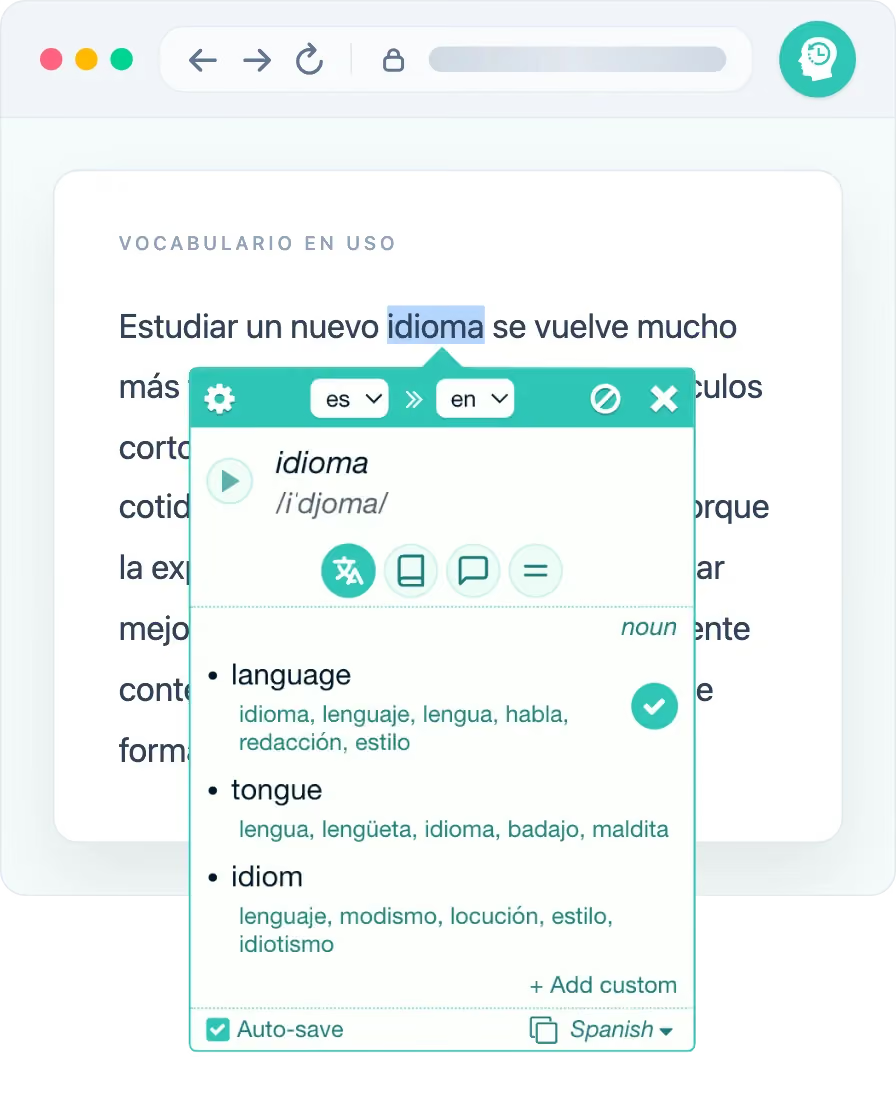
Translating a selected word directly on a web page with Rememberry

Firefox for Android

Translating selected text with the Rememberry extension in Firefox for Android
Building since
2017Building since
Users
100,000+Users
4.6★, 1,000+ reviews
4.6★1,000+ reviews
Featured by Google
Featuredby Google

One connected learning loop

Rememberry stays with a word until it becomes yours

A translation helps you finish the sentence. Rememberry connects that moment to the practice that helps you recall the word later.

  • 1. Select

    Select a phrase or double-click a word on the page. The translation opens beside the text, without another tab.

  • 2. Understand

    Compare meanings, hear pronunciation and explore dictionary context so you save the sense that fits.

  • 3. Save

    Translations are saved as flashcards by default. You can also tick the one you want and add it to a deck in one click.

  • 4. Remember

    Review when the card is due, then recognize it again through highlights on the web pages you visit.

Overview

Watch how the extension works

The walkthrough starts on the page: translate, save a flashcard, then review. The app follows.

More than a quick translation

Choose the right meaning without leaving the page

Open the in-page window from selected text, or translate from the extension itself when you need more room for meanings and dictionary details.

  • Words and phrases across more than 100 languages
  • Web pages, the extension popup and PDFs in supported browsers
  • Results grouped by part of speech, with reverse translations
  • Pronunciation for original and translated text
  • For many languages: transcription, definitions, usage examples, synonyms and antonyms
Rememberry translating in the browser side panel beside a web page

Three ways to open it

Same extension page, in the space that fits

A quick lookup and a focused session do not need the same amount of space. Open Rememberry as a toolbar popup, side panel, or full browser tab.

Rememberry translating in the browser toolbar popup

Look something up quickly

Open the toolbar popup for a compact translation without leaving your current tab.

Rememberry translating in the browser side panel beside a web page

Keep it beside the page

Use the side panel to compare meanings and examples while the original page stays visible, including on YouTube and other video pages.

Rememberry translation workspace open in a browser tab

Give language more room

Switch to the full tab when you want space for longer text, dictionary details and saved cards.

Your vocabulary, under control

Save now. Organize when it suits you.

Choose the translation that matches the context and save it as a flashcard. In the cards view, you can find, edit and organize everything you collect.

  • Browse saved cards from one place
  • Organize decks by language, topic or your own system
  • Edit cards as your understanding grows
  • Import, export and back up your vocabulary
Managing saved vocabulary cards and decks in the Rememberry extension
Spaced-repetition study session in the Rememberry extension

Spaced repetition

Review what is due

Every card you save is ready to study. Spaced repetition schedules the next review from your history and recall difficulty.

The open web becomes review

Meet saved words again in real context

Rememberry highlights vocabulary from your cards when it appears on a page you read.

  • See saved vocabulary highlighted inside page text
  • Open a mini-review from the highlight itself
  • Reveal the answer, hear either side and respond in place
  • Stay on the article instead of switching to a separate study screen
Reviewing a saved highlight directly on a web page with Rememberry

On Firefox for Android

The extension workflow you know, in Firefox on Android

Rememberry in Firefox for Android brings the familiar select-translate-save flow to mobile. Highlight text on a page, translate it in place, and save flashcards without leaving the browser.

  • In-page translation on mobile web pages
  • Save useful meanings as flashcards without copying text into another app
  • Install from Firefox Add-ons inside Firefox on Android
Translating selected text with the Rememberry extension in Firefox for Android

Easy from the first word

Install once, then learn as you normally browse

There is no course to configure and no text to import before you can begin.

  1. 1

    Add Rememberry

    Choose your browser store and install the extension for free.

  2. 2

    Select a word

    Open a page you want to read, select a phrase or double-click a word. It is saved as a flashcard by default.

  3. 3

    Keep reading

    You will see those words highlighted when they appear again online, and Rememberry will schedule their reviews.

FAQ

Before you install

Is the Rememberry extension free?
Yes. The Basic plan lets you install the extension, translate and study with limits. Ext Lite unlocks unlimited and enhanced extension features. Pro also unlocks the mobile and web app, synchronization and auto-backup to the cloud.
Do I need an account?
No account is required for basic local use: cards and settings stay in your browser. You need an account to upgrade to Ext Lite (unlimited and enhanced extension features), and to sign in with Pro when you want cards and progress synchronized with the web and mobile app.
Does the extension work on Android?
Yes, in Firefox for Android. Install Rememberry from addons.mozilla.org inside Firefox, then select text on web pages to translate and save it. Chrome and Edge on Android are not supported.
Can Rememberry translate text in PDFs?
Yes, in supported browsers and PDF viewers. Browser restrictions can affect extension access to some built-in or protected PDF pages.
Why does the extension need access to web pages?
It needs page access to read the text you select, show the translation beside it, save a card and highlight vocabulary you already learned. You can turn off in-page translation and control which sites use highlights. See the permissions FAQ for more detail.

Make the next unfamiliar word worth remembering

Install Rememberry for free, then select a word while browsing to save your first flashcard.