Learn from the web as you browse
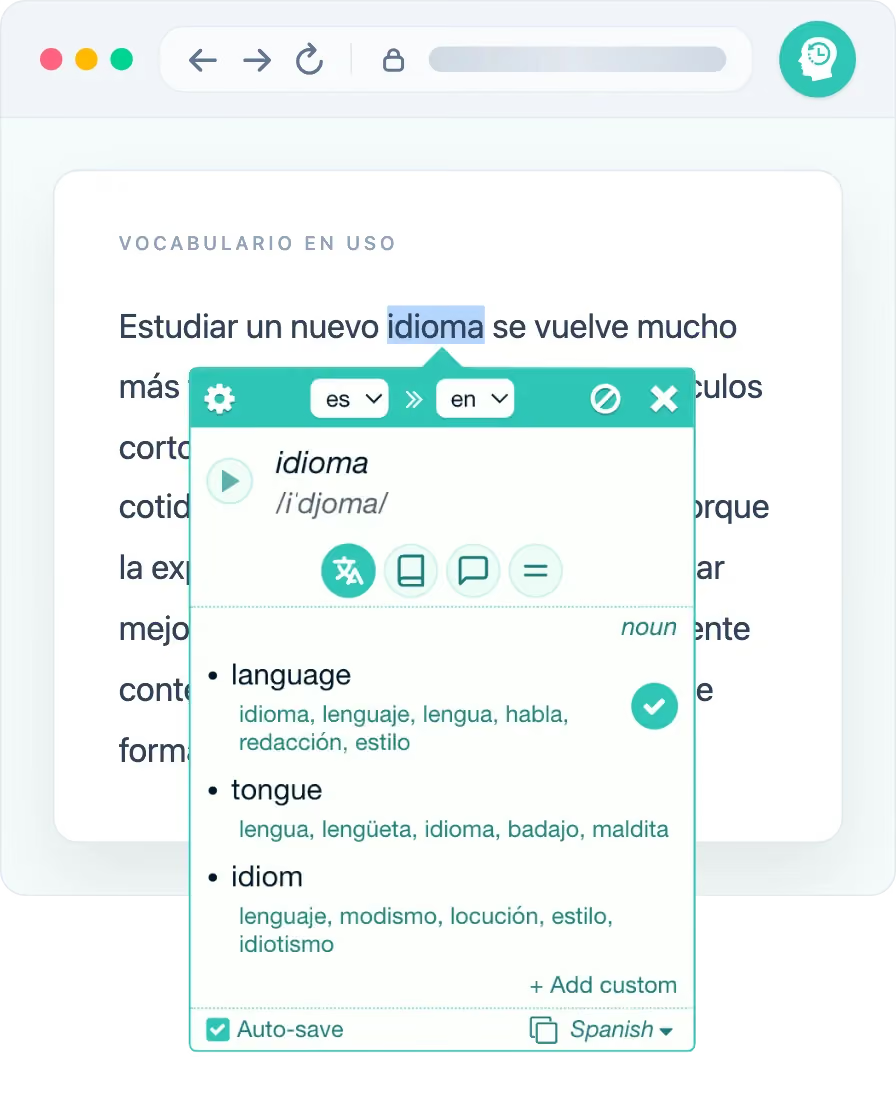
Translate on the page and save the meaning you need as a flashcard.
- Translate words and phrases directly on the page.
- Review cards with spaced repetition.
- Meet saved vocabulary again through in-page highlights.
Select and translate words as you browse with the extension. Build decks, study offline, and practice in the mobile app. Use either on its own, or keep everything in sync.
Free to start · 4.6★ from 1,000+ reviews · 100,000+ learners
Browser extension

Mobile app

How Rememberry works
Use the extension while you browse. Use the standalone app to study offline. Rememberry keeps translation, flashcards and practice in one loop.
Overview
Translate on a page, save a flashcard, then study in the extension or the app.
Two main products
The extension and the app are each useful on their own. Together they keep cards and study progress in sync.
Translate on the page and save the meaning you need as a flashcard.
A standalone app for creating decks and organizing vocabulary. Study from your phone or a modern browser.
Translate
The popup appears where you are reading, so you can choose the right meaning and carry on. Translate words and phrases across more than 100 languages. Dictionary details vary by language.

Remember in context
Rememberry highlights saved words on the pages you visit. When they show up again, you meet them in real sentences.


Mobile app
Build a deck from your phone. Organize the words and study them with spaced repetition.
FAQ
Answers to common questions before you install. Find more on the full FAQ page.
Join 100,000+ learners. Start with the extension free, or try the app on your phone.
Since 2017
Serhii and his wife founded Rememberry as an independent product in 2017. They still build and maintain it.
The Chrome extension goes live: translate while you browse and turn words into flashcards.
Learners on the Chrome Web Store cross the 100,000 mark.
Featured in the Learn Virtually category on the Chrome blog.
Read the Chrome blog postTranslate and study on the go. Work offline, and sync cards with the extension.
Read the launch postGenerate a new deck for a topic and language in the app. Or add cards to an existing one.
See the updateThe extension expands beyond Chrome and Opera. It now also runs in Firefox, including Android, and in Microsoft Edge.
See the updateLearners leave more than a thousand public reviews (still rated 4.6).
Read the reviews